pos1-130.htm

VENDORS
POS-2200 VENDORS
Everything that you sell should be defined in the system as an "ITEM". Items are identified by a "vendor" and an "item code". The vendor is who you buy the item from. For example, you might buy cookbooks from the publisher "Cookbook Cupboard" and they may have a bunch of books. You could define the vendor as "CBC". Each of their books has a number printed on the back which you could use as your item number. In this scheme, item "CBC-597311" would be the "Party Snacks" book.
POS-2200 vendor codes can be up to FOUR CHARACTERS. These can be any combination of letters and numbers. When you come up with a vendor code, try to use something that makes sense and is easy to remember. Initials work very well as in the example of "CBC" for "Cookbook Cupboard".
When coming up with vendor ID's, keep in mind that there may already be a commonly used set of initials that everyone recognizes. Of you might find that the vendor has initials or a code printed on all their products. It would make sense to use to use that code in those cases.
Things to avoid are meaningless numbers and codes. "K3" and "1653" would be ID's which are, on the surface, meaningless. ON THE OTHER HAND... if you are installing the POS-2200 software at a store which already has a numbering scheme, no matter how odd it might be, it may be best to continue using the old system. There's less new stuff to learn that way.
Vendor names and addresses are stored in the same file as the customers. POS-2200 knows the difference between the two. The same screen is used for maintaining both types of data, but the Vendor screen adds a batch of special fields.
The VENDOR maintenance screen appears below. Explainations of the fields follows.
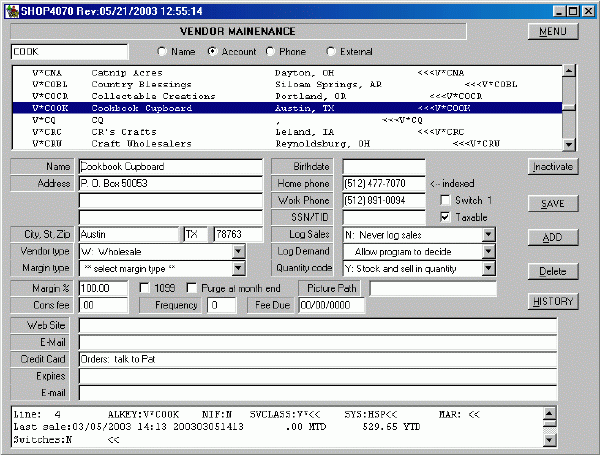
- The LIST of names at the top of the screen shows only a few names at a time. This looks like a standard Windows list with a scroll bar on the right. In fact, it is NOT a full list. The program reads only as many names as will fit on the screen. This makes the program very fast.

The program makes the scroll bar work almost like you'd expect. The only difference is that if you drag the little slider in the middle of the bar it doesn't do anything. You can click on the top and bottom arrow to move one name at a time. You can click in the white area between the slider bar and either arrow to move one "page" at a time.
- You can also search for a name by entering a partial name in the search box which is on the left above the list. Each time you click on a name that name is put into the search box. Type anything in the box and the list moves to the name closest to what you type.
- The list can be ordered in several ways by clicking one of the radio buttons above the list. Besides changing the list order, they change the contents and the way that the search box works. The list orders are:
- Name which alphabetizes on exactly what is typed. The alpha index covers only the first ten characters of the name so a group of people with the same, long last name will appear together. See the name field below for more comments on this sort.
- Account numbers are unique identifiers used by the system. The account is alpha/numeric and five characters.
- Phone sorts use the FIRST of the three phone numbers for each name. The program assumes that the area code is included. If the area is blank, that person should sort to the top of the list.
- External ID's are a separate, 12 character, alpha/numeric field that can be anything that you want.
- Name
© 2003 mmcc All Rights Reserved.
Contact MMCC at
support@mmcctech.com
pos1-130.htm