
TRANSACTION CODES
POS-2200 uses "TRANSACTION CODES" to keep track of money. You'll have a TC code for "cash", "check", "Visa card", and many other things. The system is very flexible. If you take chickens and eggs in trade for stock, you can have a transaction code for each of those.
The transaction code is a TWO CHARACTER, alpha/numeric code. That gives you about 1,400 different code possibilities.
Besides transaction codes that you come up with yourself, POS-2200 has a number of codes that are used internally. Codes that you make up can be made of numbers and UPPERCASE letters. Codes used internally by the software are all defined with lower case letters.
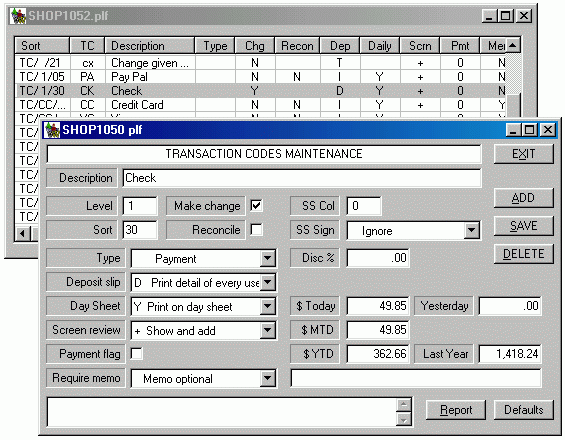
The screen shown below illustrates the TC maintenance screen. You get to that screen from the "Trans Code" button in the Maintenance column on the main menu.
A list of the most commonly used Transaction Codes is at the end of this page.
TC codes are changed by first finding and clicking on the code you want in the list on the top of the screen. You can then change anything in the bottom half of the screen. Click the SAVE button to save those changes.
A new TC code is added by clicking on the ADD button. You'll get a small screen where you enter the new Transaction code and a description. Click save and that code will be added to the list. You can then make changes to that code.
You can delete a transaction code by clicking the DELETE button. You'll get an alert screen asking you to confirm that you really want to delete the code. It's best to NOT delete transaction codes. Several sales analysis and history programs will look for the TC code to get a description. If you've deleted the code, the history reports won't know the description.If a transaction code has not been used in a long time, or if it's never been used, then it's ok to delete the code. You can tell if the code has been used by checking the totals shown on the screen.There are many options related to transaction codes. These are defined in detail following the screen shown below.
Note that the screen includes a REPORT button. This will print a grid format report of all trans codes. It can print in tranc code sequence or in reporting sequence.
The maintenance screen also includes a DEFAULT button. That one will check your system for the most commonly used codes. If any are missing they will be added to your system. (If you have already added any of these the program will NOT write over what you've done.) Using the default codes is a good way to see the settings that are commonly used for various TC types.
| Description
| | ||||||||||
| Cash
| .00
| | |||||||||
| Pay Pal
| .00
| | |||||||||
| Check
| .00
| | |||||||||
| VISA card
| .00
| | |||||||||
| Master card
| .00
| | |||||||||
| Ad 10% discount
| | ||||||||||
| House discount
| | ||||||||||
| Credit Memo redemption
| | ||||||||||
| Gift Certificate redemption
| | ||||||||||
| Lay Away redemption credit
| | ||||||||||